Showing posts with label SQL. Show all posts

Backpopulate an AutoNumber Field

If you've just implemented an autonumbering solution in CRM, newly created records will have an autonumber generated for them. Now, however, it's likely you'll need to backpopulate all records that were created before the autonumbering solution was implemented.

As an example, the SQL script below selects all Contacts in CRM and iterates through them, setting their [AutoNumber] field equal to the Contact's database row number. The script also pads this number, to keep in alignment with my autonumber syntax, which is padded to be a minimum of 10 characters long. For example, a row number of 489 is padded to an autonumber of 0000000489

When using this script, replace:

  • [AutoNumber] with the schema name of your autonumber field e.g. new_autonumber
  • [Database] with the name of your CRM database
  • [ContactBase] with the table of the entity you're looking to update. You'll also need to replace ContactId with the primary id of this entity


I recommend this autonumber from Celodon, the code for which is hosted here on GitHub.

Retrieve Option Set Metadata Via SQL

When working on projects, typically those that involve integration, several stakeholders may need to know the underlying integer values of option sets. Said stakeholders may be third parties or internal developers, who don't necessarily have access to view option set metadata in CRM. The task of providing this metadata can therefore fall to you, the CRM consultant, which can prove to be time consuming and a project bottleneck.

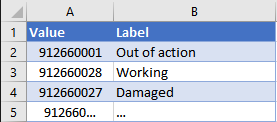
You'll move to your CRM solution, find the attribute and create an excel table for the requested option set to e-mail back to the stakeholder:

Speed things up

If you or better yet, the other stakeholder has SQL access, run the following script to generate a table of option set values and labels for a given option set:

The above code snippet retrieves metadata for the statuscode option set on the Account entity.

In the WHERE clause:

  • statuscode can be replaced with the schema name of any option set
  • Account can be replaced with the schema name of any entity

Note that the e.Name condition is not necessary if you are sure the option set attribute only exists on one entity. In this example however, we need to specify the entity because we know that statuscode exists on every entity in CRM.